
Table of Contents
- What Key Metrics Show Real Zendesk Time Savings?
- How Do I Set Up Zendesk to Maximise Efficiency?
- What Does a Successful Workflow Optimisation Look Like?
- How to Calculate the Monetary Value of Time Saved
- Why Ongoing Support is Essential for Maintaining Zendesk Time Savings
- Conclusion: Turning Minutes into Money with Zendesk
- FAQs
As a small or medium-sized business (SMB), you invest in tools like Zendesk to make your customer support team more efficient, not just to manage more tickets. The true value lies in the Zendesk time savings you generate. But how do you actually measure this impact? It’s not just about looking at the number of issues solved; it’s about translating efficiency into real-world business currency, time and money.
This guide will walk you through the key metrics and practical steps to accurately measure the efficiency gains from your Zendesk setup. We’ll show you how to move past simple ticket counts and demonstrate the return on investment (ROI) to justify your support cost justification.
What Key Metrics Show Real Zendesk Time Savings?
To effectively measure the efficiency measurement of your investment, you need to focus on metrics that directly correlate with how much time your support agents are spending on each customer interaction. This is where you find the true Zendesk Time Savings.
| Metric | Definition | Why it Shows Time Saved |
|---|---|---|
| First Response Time (FRT) | The time from when a ticket is created until an agent sends the first public reply. | Shorter FRT often means automated routing or triggers are working, saving agents time by getting the right ticket to the right person faster. |
| Handle Time / Agent Occupancy | The total time an agent actively spends working on a ticket (talk, wrap-up, research). | Lower Handle Time shows that agents have the resources (macros, knowledge base) to resolve issues more quickly, increasing agent efficiency. |
| Resolution Time | The total time from ticket creation to its final solved status. | A decrease in this metric, especially for common issues, indicates efficient workflows, self-service adoption, or successful optimisation efforts. |
| First Contact Resolution (FCR) | The percentage of tickets solved after the very first customer interaction. | High FCR means agents are quickly addressing issues without needing multiple follow-ups, eliminating the time wasted on back-and-forth communication. |
By tracking trends in these metrics, you can directly link improvements to your Zendesk implementation and subsequent optimisation efforts. You can learn more about how Zendesk measures these core support metrics directly on their help centre.
How Do I Set Up Zendesk to Maximise Efficiency?
The biggest mistake SMBs make is thinking that buying the licence is the end of the journey. A standard, out-of-the-box setup often lacks the specific configuration your business needs, which undermines your potential Zendesk Time Savings. The best efficiency measurement comes from a system tailored to your unique workflows.
Here is a simple breakdown of the core elements that, when set up correctly, save your team the most time:
- Ticket Routing & Automation: Automatically assign tickets based on language, topic, or customer type. This saves agents time spent manually sorting and reassigning.
- Macros: Pre-written responses for common questions (e.g. “Where is my order?”). A good macro library can cut down individual response time by 50% or more. And when combined with a Shopify/Zendesk Integration this shipping and order status information can be included directly in the ticket via the Macro.
- Knowledge Base (Self-Service): The fastest solved tickets are the ones the customer never has to send. Creating a customer-facing help centre means fewer common questions ever reach your agents, allowing them to focus on complex issues.
- Omnichannel Integration: Pulling all channels (email, chat, social) into a single agent workspace (the support CRM) eliminates time wasted switching between systems.
The Optimo Pivot: Turning Complexity into Efficiency
Initial setup and ongoing optimisation are where many non-technical SMB owners or operations managers encounter friction. Zendesk is a powerful tool, but configuring the automation, triggers, and macros for maximum efficiency can be time-consuming and complex. If you need a detailed guide, Zendesk provides excellent resources on streamlining your support workflow. Or you can book a discovery call with Optimo to discuss our implementation packages.
This is where Optimo provides essential expertise. As a Qualified Zendesk Partner, we don't just sell you the licence we provide the implementation and setup. We partner with you to understand your specific support cost justification needs, and execute the optimisation and workflow improvements that translate directly into substantial Zendesk Time Savings for your agents. Our goal is to ensure your support CRM is working for you from day one.
What Does a Successful Workflow Optimisation Look Like?
Optimisation is an ongoing process that refines your support operations for maximum speed and quality. This process is key to maintaining high levels of efficiency measurement.
A successful optimisation effort typically follows these actionable steps:
- Audit Current State: Review the last three months of support data. Identify the top 10 most time-consuming or high-volume ticket types. Which steps took the longest?
- Identify Bottlenecks: Look for tickets that were reassigned more than twice or required back-and-forth with internal teams. These are prime targets for workflow improvement.
- Design a Solution: If a ticket type takes too long, implement a dedicated macro, a new internal workflow, or an external-facing knowledge base article.
- Test and Train: Roll out the change to a small pilot group. Train all agents thoroughly on the new process or macro.
- Measure the Impact: Go back to your core metrics (FRT, Resolution Time, FCR). Did the change decrease the time spent on that specific ticket type?
The key to identifying these bottlenecks is leveraging Zendesk's built-in analytics, which can be explored in detail on their analytics and reporting documentation page.
How to Calculate the Monetary Value of Time Saved
The ultimate justification for any investment is its financial return. To calculate the monetary value of your Zendesk Time Savings, you need to turn minutes saved into pounds saved. This helps justify your support cost justification.
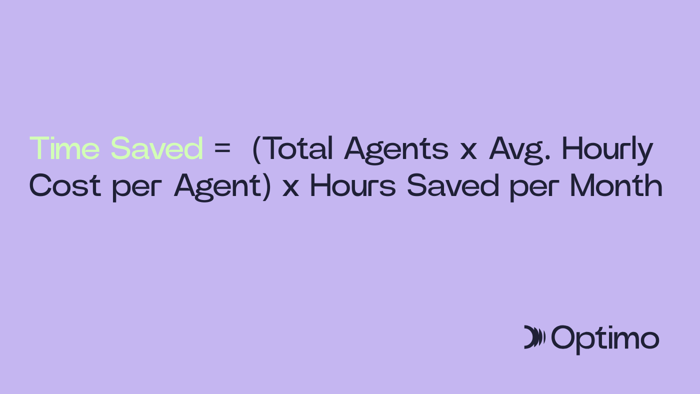
Here’s a simple formula:
Step-by-Step Calculation for Your SMB:
- Establish Agent Hourly Cost: Take an agent's gross annual salary and divide it by their annual working hours (approximately 2,080). For example, a £30,000 salary is roughly £14.42 per hour.
- Determine Time Savings: If, after implementing Zendesk automation, your Average Handle Time (AHT) drops by 2 minutes, and your team handles 2,000 tickets a month, the total time saved is: 2,000 tickets x 2 minutes = 4,000 minutes per month (or approx 66.7 hours).
- Calculate Monetary Value: Multiply the hours saved by the hourly cost: 66.7 hours x £14.42/hour = £961.41 saved per month.
This clear, tangible figure gives you a powerful argument for the efficiency measurement of your Zendesk setup and proves its value to the business.
Why Ongoing Support is Essential for Maintaining Zendesk Time Savings
Technology changes, businesses scale, and customer needs evolve. The efficiency you achieved with your initial setup will erode over time if you don't maintain it. Ongoing technical support and optimisation are critical for sustained Zendesk Time Savings.
Optimo offers ongoing technical support to ensure your system continues to run smoothly and adapt. This includes:
- Proactive System Health Checks: Ensuring all integrations are working and automation rules aren't conflicting.
- Workflow Refinement: As your business grows, we help you adapt your macros and routing to handle new types of support CRM queries or higher volumes.
- New Feature Adoption: We advise and help implement the latest Zendesk features that can offer further efficiency gains.
By treating your Zendesk setup as a dynamic system that requires continuous, expert tuning, you prevent efficiency from stagnating and ensure you always maximise your support cost justification.
Conclusion: Turning Minutes into Money with Zendesk
Achieving true Zendesk Time Savings goes far beyond merely counting the number of tickets your agents close. It’s about measuring the tangible impact of an efficient support CRM on core metrics like First Response Time, Handle Time, and First Contact Resolution, and then translating those minutes into real monetary savings for your business. For any SMB focused on efficiency measurement, a correctly implemented and optimised Zendesk setup is an asset, not just an expense.
If you’re looking to unlock these efficiency gains without the headache of complex setup and maintenance, Optimo can help. As your Qualified Zendesk Partner, we provide the straight forward, actionable expertise you need to ensure success, from licence sales to ongoing optimisation and support.