

Table of Contents
TL;DR (Too Long; Didn't Read)- The Problem: Switching tabs between Shopify and your email inbox wastes ~2 minutes per ticket.
- The Solution: A deep Shopify Zendesk integration puts live data (orders, tracking, refunds) directly inside the support chat.
- The Result: Agents work 50% faster, and you stop losing sales to slow service.
The "Black Friday" Nightmare
Picture this: It is peak season. A customer emails asking, "Where is my order?" If you don't have a seamless Shopify Zendesk integration, answering this simple question sends your agent on a time-wasting journey:
- Read the email.
- Highlight and copy the email address.
- Alt-Tab to a new window for Shopify.
- Paste the email and hit search.
- Scroll to find the order status.
- Alt-Tab back to the email.
- Type the reply.
This dance takes about 2 minutes per ticket. That doesn't sound like much, but if you get 100 tickets a day, you are wasting over 3 hours of paid staff time every single day just switching windows.
This is the "Alt-Tab Tax." It is the reason growing stores often feel like they are drowning in tickets. The problem isn't your people; it's the lack of a proper Shopify Zendesk integration connecting your data to your conversation.
The Solution: Bringing the Data to the Conversation
You don't need more agents; you need better visibility. By implementing a robust Shopify Zendesk integration, you change the workflow completely.
Here is what an optimised support setup looks like:
1. The "Sidebar" of Truth
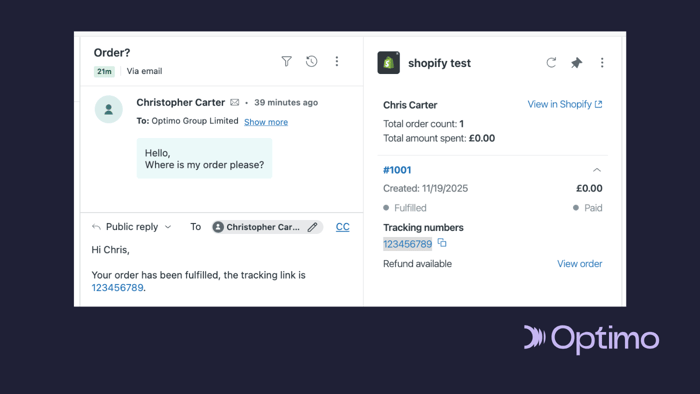
When an agent opens a ticket in Zendesk, a sidebar should instantly load the customer's Shopify profile.
- What they see: Recent orders, current tracking numbers, and total lifetime spend.
- Why it matters: The agent knows immediately if they are talking to a VIP customer who has spent £5,000 or a first-time buyer. No searching required.
2. One-Click Actions (No More Copy-Pasting)
Instead of logging into Shopify to process a refund or cancel an order, you can do it directly from the Zendesk window.
- The Efficiency Hack: An agent can hit a "Process Refund" button right next to the chat window.
- The Safety Net: You can restrict this permission so only senior agents can approve money movements, keeping your finances secure.
[Insert Screenshot 2: Zoomed-in view of Shopify Sidebar showing 'Process Refund' button]
3. The "Where is my Order?" Instant Answer (via Copilot)
Roughly 60% of ecommerce tickets are just people asking for tracking updates. Writing these emails manually is a waste of human potential.
- The Fix: We deploy Zendesk Copilot to handle the heavy lifting.
- The Workflow:
- Copilot analyses the customer's email and detects the intent ("Where is my order?").
- It instantly references the Shopify data associated with that user.
- It suggests a ready-to-send email for your agent, complete with the correct tracking link and order status already inserted.
- The Gain: Your agent simply reviews the draft and hits "Send." What used to be a 2-minute search is now a 5-second review, keeping a human in the loop but removing the manual labour.
Deep Dive: The Technical Setup (For the Ops Team)
(Note: This section is for your technical lead. If you are the owner, you can skip to the conclusion!)
To achieve maximum automation and data syncing, we don't just use the standard "Marketplace App." We recommend a custom Shopify Zendesk integration configuration:
- Webhooks for Real-Time Tags: We configure Shopify Webhooks (specifically orders/risk_analyzed) to tag Zendesk tickets based on risk analysis. If an order is flagged "High Risk" in Shopify, the ticket in Zendesk is automatically routed to the Fraud Team, bypassing general support.
- Sunshine Conversations API: For high-volume stores, we utilise custom development services to pull "Loyalty Points" into the ticket view. This allows agents to offer point-based compensation instead of cash refunds, preserving your revenue.
Why This Matters for Your Bottom Line
Customer Support is often seen as a "Cost Centre"—a place where money goes to die. With the right Shopify Zendesk integration, it becomes a Sales Engine.
When an agent can see that a customer bought a winter coat last week (visible in the sidebar), they can recommend the matching scarf during a support chat. That is an upsell you simply can't make if you are stuck blindly answering emails.
Don't let your support stack slow down your growth.
Need Help with the Setup?
At Optimo, we specialise in turning chaotic support queues into streamlined revenue engines.
- Already use Zendesk? Let us audit your setup to see if you are missing these Shopify features.
- New to Zendesk? We can assist in procuring your Zendesk Licences and handle the entire migration for you.